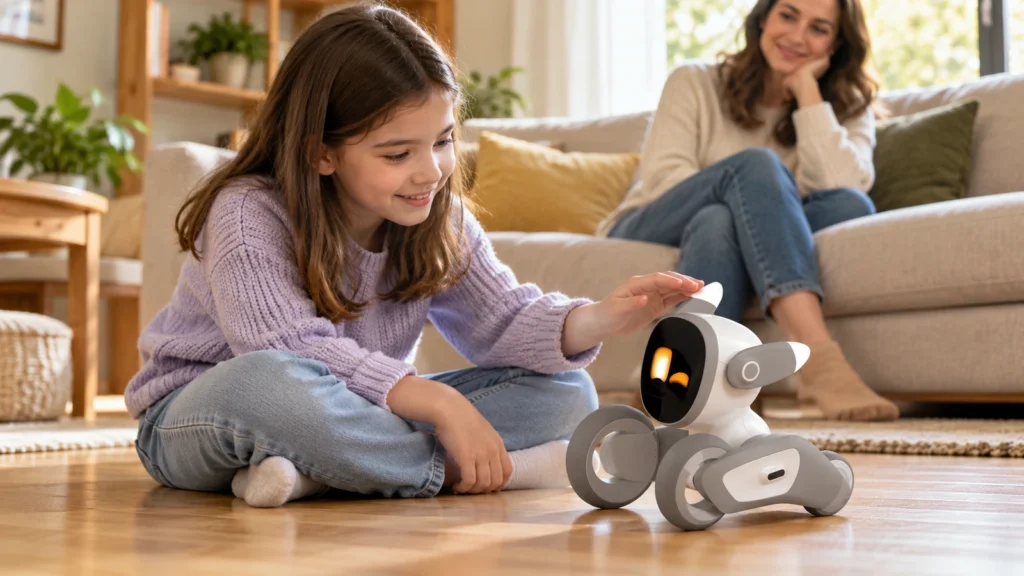
Loona Petbot can be safe and entertaining for children when adults handle the initial setup, establish clear rules and supervise younger users. It is not recommended for children under three and should not be treated as a babysitter.
The main considerations are not only physical safety. Loona also includes a camera, microphones, facial recognition and remote monitoring, so parents should understand its privacy settings before allowing unrestricted use.
Quick answer: Loona is best suited to families that are comfortable supervising a connected AI device and teaching children how to interact safely with a moving robot.
This article contains affiliate links. OFUD may earn a commission from qualifying purchases at no additional cost to you. This guide is based on current product information and published safety guidance rather than an in-house physical test.
What age is Loona Petbot suitable for?
Loona’s safety guidance states that it is not suitable for children under three years old. Adult supervision is recommended for younger users.
The restriction is important because Loona is not a soft or stationary toy. It contains moving joints, wheels, electronic components and accessories.
A practical family guide would be:
| Age | Suggested use |
|---|---|
| Under 3 | Not recommended |
| Ages 3–6 | Close adult supervision |
| Ages 7–12 | Guided setup and clear household rules |
| Teens | More independent use with privacy settings managed by an adult |
The age groups above are practical suggestions rather than official manufacturer ratings beyond the under-three restriction.
Is Loona physically safe for children?
Loona uses wheels and sensors to move around furniture and avoid obstacles. However, it can still turn suddenly, bump into objects or surprise a child sitting on the floor.
Parents should establish a few basic rules:
- Do not grab Loona while it is moving.
- Do not force its ears, body or joints.
- Keep fingers away from moving sections.
- Use it on flat, stable surfaces.
- Keep it away from stairs and raised edges.
- Do not use it near water, sinks, pet bowls or spilled drinks.
- Remove cables, small toys and other objects from its path.
Children should also understand that Loona is an electronic device rather than an indestructible toy. Rough play can damage its motors, joints, camera or charging contacts.
Does Loona have a camera and microphone?
Yes. Loona includes a 720p RGB camera, a four-microphone array, facial recognition and remote viewing capabilities.
These features allow Loona to:
- Recognize members of the family.
- Respond to voices and locate sounds.
- Interpret objects shown to its camera.
- Navigate the home.
- Provide remote monitoring through the app.
They also mean that Loona is effectively a mobile connected camera inside the house. Families should decide where the robot is allowed to move and when remote monitoring will be used.
Bedrooms, bathrooms and other private areas should generally remain outside its normal play space.
Does Loona record everything?
Loona needs its camera and sensors to recognize people and navigate, but that does not automatically mean it continuously saves every moment as a permanent recording.
Some processing is performed on the robot itself, and the product documentation describes a hardware encryption chip intended to help protect local data. However, connected features such as voice recognition and remote monitoring depend on online services.
The company’s public privacy policy says it may collect account information, device details, IP addresses, usage information and diagnostic data. It may also share necessary information with service providers involved in operating the service.
That does not mean Loona is automatically unsafe. It means parents should treat it with the same care they would apply to a smart camera, voice assistant or connected doorbell.
How can parents make Loona more private?
A few simple choices can significantly reduce unnecessary exposure.
Let an adult control the account
The primary account, password and recovery email should belong to a parent or guardian. Children should not create their own accounts or share login information.
Use a unique password
Do not reuse a password from email, banking or social media. A strong password limits the damage if another service experiences a leak.
Review app permissions
Check which permissions the Loona app requests. Enable only what is required for the features your family intends to use.
Keep the software updated
Firmware and app updates may include security and stability improvements. Avoid postponing them indefinitely.
Consider a separate Wi-Fi network
Many modern routers allow smart devices to use a guest or isolated network. This can separate Loona from computers and other devices containing sensitive information.
Establish private areas
Keep Loona out of bedrooms, bathrooms and workspaces containing confidential documents. Physical boundaries are often easier for children to understand than complicated settings.
Is Loona a safe source of information for children?
Loona’s AI conversations can answer questions and tell stories, but connected AI can still misunderstand a question or produce an inaccurate answer.
Children should not be taught to treat Loona as an unquestionable source of truth. Parents should encourage them to verify important information with an adult, teacher or reliable educational source.
The same applies to emotional attachment. Loona can simulate moods and companionship, but it does not understand a child in the way a person or living pet does.
Can Loona replace adult supervision?
No. Loona’s remote monitoring feature does not make it a security system, baby monitor or babysitter.
Its camera view may be interrupted by a weak connection, low battery, sleep mode, obstacles or navigation problems. The robot cannot identify every dangerous situation or respond appropriately to an emergency.
Loona works best as an interactive companion used within boundaries established by adults.
You can read more about its battery, connection and navigation limitations in our guide to common Loona Petbot problems.
Is Loona a good gift for a child?
Loona can be a memorable gift for a child who enjoys robots, games, technology and beginner programming. It offers more variety than a simple remote-controlled toy and has enough personality to encourage repeated interaction.
The purchase makes less sense for very young children, rough play or families uncomfortable with connected cameras and microphones.
For a complete look at its features and long-term value, see our Loona Petbot review.
See Loona Petbot’s current availability on Amazon
Frequently asked questions
Is Loona safe for a five-year-old?
It can be used with close adult supervision. Parents should manage the app, establish a safe play area and teach the child not to grab or force the robot’s moving parts.
Is Loona suitable for children under three?
No. The safety guidance states that Loona is not suitable for children under three years old.
Can parents see through Loona’s camera?
Loona includes remote monitoring through its app. Access depends on the robot’s power, connection, account and current operating state.
Does Loona listen all the time?
The microphones allow Loona to detect sounds and respond to its wake phrase. Voice recognition and connected conversations use online services, so families should review the relevant permissions and privacy terms.
Can Loona be used as a baby monitor?
It should not replace a dedicated baby monitor or adult supervision. Battery, Wi-Fi, sleep mode and navigation can interrupt access.